Showing posts with label s5360. Show all posts
Showing posts with label s5360. Show all posts
Friday, October 28, 2016
Custom Rom Kitkat Cyanocream v4 for Samsung Galaxy Y GT S5360
Custom Rom Kitkat Cyanocream v4 for Samsung Galaxy Y GT S5360
Oke bro langsung saja malam ini saya akan memberikan custom rom buat gakyoung yaitu Custom Rom Kitkat Cyanocream v4 for Samsung Galaxy Y [GT-S5360]
Lihat Penampakannya:
![Custom Rom Kitkat Cyanocream v4 for Samsung Galaxy Y [GT-S5360]](https://blogger.googleusercontent.com/img/b/R29vZ2xl/AVvXsEhOkyjdutRgFZvaaI90Fc8-tvcFesXsztSkpKfj_RM402el8TclMjx4HNKKDLNm8rcQVgXTwoIDhuv0ruwyH26KsMnGsnJxPs8jk1AO46wCG-XfdfJ1J7dnlwDmFfsQjyCNNI0cw2JdY84u/s1600/wallpaper_01.jpg "Custom Rom Kitkat Cyanocream v4 for Samsung Galaxy Y [GT-S5360]")

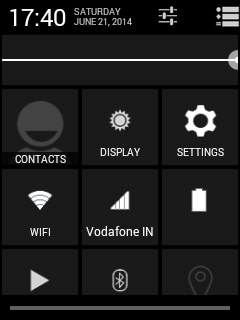

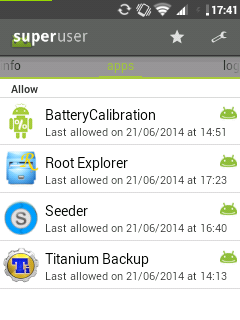

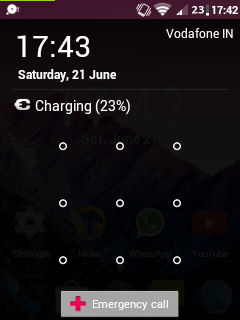
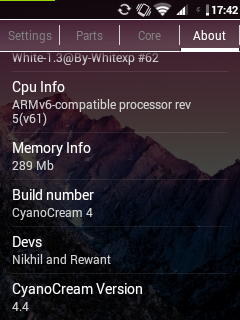
Bahan:
- A rooted Galaxy Y with a stock rom
- CWM download it from here
- Cyanocream v4 from here
- Cyanocream v4.1 from here (update only)
- Cyanocream v4.2 from here (update only)
- Turn off your phone and wait till it vibrates
- After it vibrates press the three button combo (volume up+home+power button)
- Then use the volume up/down keys and select apply update from sd card and select CWM Recovery.zip
- Now go to mounts and storage and mount all partitions except the sd-ext because it is not possible on the stock kernel of galaxy y
- Then go to apply update from sd card and then choose zip from sd card
- After that select Cyanocream v4.zip
- Aroma Installer will start after a few seconds
- Choose a theme of your choice
- Then keep pressing next in the instructions
- After that select installation of stock kernel
- Do not select reboot after installation
- Now select install
- After the installation of the stock kernel is complete go to advanced and select reboot recovery
- After that the phone would boot again the stock recovery (the red one)
- Again select apply update from sd card and then select CWM Recovery.zip
- Now select apply update from sd card, choose zip from sd card and then select Cyanocream v4.zip
- This time select installation of White XP 1.3.3 and DO NOT select reboot after installation.
- Again go to advanced and then select reboot recovery
- Now again select Cyanocream v4.zip from sd card
- This time choose the installation of Cyanocream Rom and select reboot after installation
- The installation will take some time to complete
- Now the device will reboot on its own.
- The first boot will take time (4-5 minutes) and it might even show the boot animation 2 times so dont think that it is stuck in a bootloop
- Finally you have installed Cyanocream v4 on your galaxy y
Go to link download

Wednesday, October 26, 2016
CUSTOM ROM GT XPERIA U GALYOUNG GT S5360
CUSTOM ROM GT XPERIA U GALYOUNG GT S5360
| Oke kali ini saya akan memberikan custom rom yang stabil buat galyoung gts 5360 CUSTOM ROM GT XPERIA U [GALYOUNG] GT-S5360 , oke langsung saja penampakannya dibawah ini: |
Screenshoot:

![CUSTOM ROM GT XPERIA U [GALYOUNG] GT-S5360](https://blogger.googleusercontent.com/img/b/R29vZ2xl/AVvXsEjnaGAF6x8PmZElYOMcH80RsecMSN2oYnUQJW7FvvhGOm0icb25wUhBJma0ktGVSrz45Lm4IosiQ43Ph_Xul5tiVjwWnQ1iCFF0iNxqI6tXhMbAwQMopXAm0PurtK4BRYKjUgLpHHp4lp5n/s320/vedhbv.jpg)
![CUSTOM ROM GT XPERIA U [GALYOUNG] GT-S5360](https://blogger.googleusercontent.com/img/b/R29vZ2xl/AVvXsEhNXRN1ZpyEmXiF4ZJ_-2eGUBRaF5T0Wb-vLwHzOwCYXvxrCTc5Z-6LI-F3i8gCPOPIVvqZatfx2O118B53J_rUxleouG1HceItMR50joCWgQnxRceqQcJd1T6rulerS9xM1uI0n5i9IzdS/s320/presentation1fdggf.jpg)
![CUSTOM ROM GT XPERIA U [GALYOUNG] GT-S5360](https://blogger.googleusercontent.com/img/b/R29vZ2xl/AVvXsEiDQQgJ6xqFS9nsd3b1H-yLKnOAswjxWoORqHsBeAv4R8g2LQikhhqOJklU5PqEUoRJEwPJLi7aTetyx_1hBHdYZFONkkAOD_XNjzDWIpU8J9gFXkf4Opo43thKvGMRJKOK_6F5P0seNKeY/s320/presentation11r.jpg)
Downloads:
ROM - Click here.
Patch - Click here. (Mandatory!)
ROM - Click here.
Patch - Click here. (Mandatory!)
Features:
- Minimal apps
- JB themed apps
- Real JB deskclock
- JB dialer
- JB contacts
- Statusbar
- Xperia apps
- Play on device
- All working xperia apps
- Timescape working
- New xtreme app
- Xperia lock
- Framework
- New messaging
- Settings with new tabs
- Many tweaks
- Download the rom and patch files to your sdcard
- Boot into recovery mode, then flash CWM Recovery (you should know how to do this)
- Go to mounts and storage
- Choose /mount system (if you do not see it, it is already mounted in that case skip this step and follow step 5)
- Choose format /system
- After done, choose mount /system
- Go back, wipe cache and data
- Choose to install the zip
- Find the rom zip file and choose Yes when asked
- After done, reboot
- Power off, boot back into recovery mode and flash the patch zip file
- Reboot and enjoy
terimakasih itu tutorial CUSTOM ROM GT XPERIA U [GALYOUNG] GT-S5360
baca juga Custom Rom CD FUTURE 8.2 for galyoung Stabel
Go to link download
Monday, October 24, 2016
Cyanogenmod 12 Lollipop 5 0 x untuk Samsung Galaxy Y GT S5360
Cyanogenmod 12 Lollipop 5 0 x untuk Samsung Galaxy Y GT S5360
Selamat Malam semuanya! Hallo sobat saya akan memberikan berita tentang Cyanogenmod 12 ( Lollipop 5.0.x ) untuk Samsung Galaxy Y GT - S5360 Berita bagus bagi penggemar Cyanogenmod ! Samsung galaxy Y GT - S5360 akan mendapatkan CyanogenMod 12 Custom rom . Ini berarti bahwa perangkat pengguna Samsung galaxy Y GT - S5360 akan segera merasakan Android 5.0.x Lollipop di galyong . Berita ini ditunggu-tunggu para pengguna Samsung galaxy Y GT - S5360 dalam waktu yang amat lama . Cyanogenmod 11 juga mendapatkan stabil setelah setiap update . Saya hanya berharap bahwa pengembang cyanogenmod 12 ( android armv6 ) bergegas dan merilis versi stabil cyanogenmod 12 karena mereka sudah merilis membangun eksperimental tetapi tidak flashable dan ada sedikit bug.
 |
| cyanogenmod 12 |
Tapi sayang nya proyek cyanogenmod 12 telah ditutup oleh pengembang jadi tak usah khawatir karna cyanogenmod 11 sudah ada yang final. baca disini
Go to link download
Sunday, October 23, 2016
Kuro Kernel Untuk Samsung Galaxy Young GT S5360
Kuro Kernel Untuk Samsung Galaxy Young GT S5360
Hallo sobat kali ini saya akan membagikan tantang Kuro Kernel Untuk Samsung Galaxy Young GT-S5360. Tutorial ini saya ambil dari xda Developer , kurotsugi mengembangkan kernel untuk Samsung Galaxy Y bernama Kuro Kernel . Kernel ini mendukung semua ROM termasuk Stock ROM .

Kuro Kernel Untuk Samsung Galaxy Young GT-S5360
Fitur:
- Compatible to all ROMs
- Simple,Light,Yet Customizable
- Save more Batteries
- Decent Performance
- Init.d Support
- Advanced Power Management Enabled
- Droidwall Support
- BaCeM Tweak
- 4 Frequencies
- A Few more Governor and I/O
Downloads:
- Kuro Kernel:
http://www.mediafire.com/?riasr3aoqop48t8
- Flash the zip file via ClockworkMod (CWM) Recovery.
- Enjoy
Credits:
- Irfanbagus
- Savie
- MarcoToo
- Harish
- Maroc
- Kurotsugi
- lastly You.
Baca juga : Custom Rom [CM7] Optimus Nexus Me v5 Untuk Galaxy Y GT-S5360
Go to link download
Thursday, October 20, 2016
CUSTOM ROM CD Venus X10 Style Hyperion X Galyoung GT S5360
CUSTOM ROM CD Venus X10 Style Hyperion X Galyoung GT S5360
Oke saya akan memberikan tutuorial sekaligus custom rom terbaru galyoung gt s5360 [CUSTOM ROM] CD Venus X10 [Style Hyperion X] Galyoung GT-S5360 oke langsung saja bisa dilihat penampakannya dibawah ini:
![[CUSTOM ROM] CD Venus X10 [Style Hyperion X] Galyoung GT-S5360](https://blogger.googleusercontent.com/img/b/R29vZ2xl/AVvXsEiKCcY0Q5VkM5SkWecaJPzHxP7ltZ8HHp8An_8eB6NvxdqCjvUxu826gP9PI3B9_Ja10bQJPCpiKT_Y0_oardcAtyMtgGKgUKXYzyztESiKoNPgb0zekFNPts6LC6Wq761Xj85mta7-OH8/s400/dcsms1442236693308.jpg)
![[CUSTOM ROM] CD Venus X10 [Style Hyperion X] Galyoung GT-S5360](https://blogger.googleusercontent.com/img/b/R29vZ2xl/AVvXsEhhMs6MDc1KX9QbW_98sLjvR-8WlYj3n15e7QEWcqmT96T8gLs3br9EiQPPC0cXHD2iAk1HZW2QHAoZvhlj-GHA6m9AAftRZfeNyAIFdQnz0kSb9muxtb5xM88APGwVZGI8uBZreZeQhVw/s400/dcsms1442236044988.jpg)
![[CUSTOM ROM] CD Venus X10 [Style Hyperion X] Galyoung GT-S5360](https://blogger.googleusercontent.com/img/b/R29vZ2xl/AVvXsEi24xa_TqJymc3DLO9nLiaJblwVinz8VE7kpBZNeUyrFB7yGzLM93spmveTAVJTvuk1qgUEPjzSgWFjFNSQdA9Krv6eNQ_rurJyFtCOJ6CKxphkRpsZPprDFvK6jqXPT-oSRkGrJFojkMc/s400/dcsms1442236355818.jpg)
![[CUSTOM ROM] CD Venus X10 [Style Hyperion X] Galyoung GT-S5360](https://blogger.googleusercontent.com/img/b/R29vZ2xl/AVvXsEiOgj5If_RB-kEGtDiuEyfZX4qvl28O0RvqgqM3pJN-m7uJsvtCmJ-psEdkfD9yZgKQYQfRnwBlsAGF_4xYgkGqblOTjRqQHTnecZmLM632irg0dSRHtCg9jhsh6xW0ZEIKtZg8vIEII8Q/s400/dcsms1442236419512.jpg)
![[CUSTOM ROM] CD Venus X10 [Style Hyperion X] Galyoung GT-S5360](https://blogger.googleusercontent.com/img/b/R29vZ2xl/AVvXsEiHtrZDYP0VnOZ3LEc56-q7vsqtGsXMYF-g-YDfJwZqSp1O1MQ1joFlcjDZj4oZE86f5vFeSo3dkuRl9D380oEew8RH94Qb9JVlhYkMn5JPrzJPrRnTDA_yV-iSclj_-5Df_uGcbKQLR2M/s400/dcsms1442236522802.jpg)
![[CUSTOM ROM] CD Venus X10 [Style Hyperion X] Galyoung GT-S5360](https://blogger.googleusercontent.com/img/b/R29vZ2xl/AVvXsEjOGJAmT1RXEKkwL_XHD-aM0-hfyJUZMYpEsoiobvHvbGvdstpceEpmpCrBwyOlmEu7i-4NgTH95eRSzRF4Y3uyuvE7O6fJfHQzhzBswwPP0NE08cFkfyJ8qpt2RGD4lKTxhuePOPU3fCg/s400/dcsms1442236616616.jpg)
![[CUSTOM ROM] CD Venus X10 [Style Hyperion X] Galyoung GT-S5360](https://blogger.googleusercontent.com/img/b/R29vZ2xl/AVvXsEh-Y9SkQkL7WVlWIsgHdiwjk8ARXFm16wcWoram8EaWkIFanUdUx7vpV5NGZdlaXQqxxQLFGb1aNMxrtEyHXLxvE9_HsLy0ISUd2YI4ir3cudNjgYeYfbbFsj34J2rqiuofsImjnWPUxKM/s400/dcsms1442236759075.jpg)
1.System Rom
-Base DXMJ1 Custock
-Rom Deodex
-Kernel Free
Dialer Dark Style Hx
MMS Full light Style Hx
Music full light Style HX
Contact Dark style rom dev
Memo full light style rom dev
Setting dark Style HX
+Add 3 tab
+Dividing the proper function
+Add ChangeLog
+Mod Setting Lock Style Dev
Camera style 4x
Desk clock dark style rom dev
Fm radio dark style rom dev
Myfile full light style HX
Voice Full light Style HX
Calculator Full light stylw HX
Calender Full light style rom dev
Jobmanager Dark style Rom dev
Internet Full light
kikat EGG Platlogo
Phone.apk Dev Style Rom
Download manager dark style rom dev
Googlequick full light
Simtoolkit New style full light rom dev
Visualizer Full light
Cpu Full light
Spy CPU full light
App auto reboot full light
Systemui Style HX Dev
+Add 2 tab
+Gird Toogle
+Animation
+Custom Signal(Left/Right)
+Ram pross
+EDT Tweak support
+Swipe notifi
+Internet master
Framework-res HX Style
+Volume penel ics
+USB Store ics style
+Add Back Button on Actyviti
+Support Icon Hyperion HX
+Rencel Swipe app Style Hx
-Add ram pross on rencel
+Support Theme and Theme Light
Lock rom dev
+Lock Pass style Rom Dev
-Add Custom text
+Lock Portrait Style Rom Dev
-Add Cerricer
-Add Custom Image
+Lock ICS Style HX
-Support Music Control(Show/hide)
-Add and Custom name
-Add carricer
-Add Visualizer
-Add Custom Image
2.Custom Rom
CD Sound boosted
Support init.d
Tweak init.d dev CD Team
-Base DXMJ1 Custock
-Rom Deodex
-Kernel Free
Dialer Dark Style Hx
MMS Full light Style Hx
Music full light Style HX
Contact Dark style rom dev
Memo full light style rom dev
Setting dark Style HX
+Add 3 tab
+Dividing the proper function
+Add ChangeLog
+Mod Setting Lock Style Dev
Camera style 4x
Desk clock dark style rom dev
Fm radio dark style rom dev
Myfile full light style HX
Voice Full light Style HX
Calculator Full light stylw HX
Calender Full light style rom dev
Jobmanager Dark style Rom dev
Internet Full light
kikat EGG Platlogo
Phone.apk Dev Style Rom
Download manager dark style rom dev
Googlequick full light
Simtoolkit New style full light rom dev
Visualizer Full light
Cpu Full light
Spy CPU full light
App auto reboot full light
Systemui Style HX Dev
+Add 2 tab
+Gird Toogle
+Animation
+Custom Signal(Left/Right)
+Ram pross
+EDT Tweak support
+Swipe notifi
+Internet master
Framework-res HX Style
+Volume penel ics
+USB Store ics style
+Add Back Button on Actyviti
+Support Icon Hyperion HX
+Rencel Swipe app Style Hx
-Add ram pross on rencel
+Support Theme and Theme Light
Lock rom dev
+Lock Pass style Rom Dev
-Add Custom text
+Lock Portrait Style Rom Dev
-Add Cerricer
-Add Custom Image
+Lock ICS Style HX
-Support Music Control(Show/hide)
-Add and Custom name
-Add carricer
-Add Visualizer
-Add Custom Image
2.Custom Rom
CD Sound boosted
Support init.d
Tweak init.d dev CD Team
Custom Rom Comot disini
Cara Flashing Romnya:
-Wipe data
-Wipe cache
-Wipe dalvid cache
-Unmount system
-Unmount data
-Unmount cache
-Unmount sdcard
-Flash rom.zip
-Reboot system now Enjoy
-Wipe cache
-Wipe dalvid cache
-Unmount system
-Unmount data
-Unmount cache
-Unmount sdcard
-Flash rom.zip
-Reboot system now Enjoy
Untuk pertama kali Booting emang sedikit lama tapi jangan panik
DWYOR Bro!!!
Credits:
CarlDean Catabay@XDA credits image and 9 patch
b16h22@xda
Tenten Ponce@xda
Droidbuster@xda
DCM sms@xda
Kevin Vengeance@xda
MuSaddiq@xda
San122@xda
Nemesis Team@Nemesis
Hyperion team@xda
iamareebjamal@xda
accts@xda
Lidroid@xda
Sniper Killer@xda
PineappleOwl@xda
PxL Team@xda
Mariozawa(Potato)@xda
92mey@xda
marinalin85@xda
d3cka@xda
den-den-salazar@xda
AndroidFire@xda
Baca Yang Bener@sae-pool
User Visualizer 8 style@Google.com
Himan Boro@xda
True $tar@xda
rhievaldo@xda
CyanogenMod Team@Cyanogen
ImbaWind@xda
teztaz--v3@xda
A few more that I do not remember the guides name thank all
Thank to
Pha?m ?e?n
Thank to tester
Go to link download
Read more »
CarlDean Catabay@XDA credits image and 9 patch
b16h22@xda
Tenten Ponce@xda
Droidbuster@xda
DCM sms@xda
Kevin Vengeance@xda
MuSaddiq@xda
San122@xda
Nemesis Team@Nemesis
Hyperion team@xda
iamareebjamal@xda
accts@xda
Lidroid@xda
Sniper Killer@xda
PineappleOwl@xda
PxL Team@xda
Mariozawa(Potato)@xda
92mey@xda
marinalin85@xda
d3cka@xda
den-den-salazar@xda
AndroidFire@xda
Baca Yang Bener@sae-pool
User Visualizer 8 style@Google.com
Himan Boro@xda
True $tar@xda
rhievaldo@xda
CyanogenMod Team@Cyanogen
ImbaWind@xda
teztaz--v3@xda
A few more that I do not remember the guides name thank all
Thank to
Pha?m ?e?n
Thank to tester
Go to link download
Thursday, October 13, 2016
Cara Flash Ulang Samsung Galaxy Young GT S5360
Cara Flash Ulang Samsung Galaxy Young GT S5360
Hallo bro kali ini saya akan menjelaskan tantang Cara Flash Ulang Samsung Galaxy Young GT-S5360 Via Odin. Biasanya kita lakukan flashing ketika system sudah tidak stabil. dan bisa juga apabila ponsel sering terjadi error, sering nge-lag, sedangkan upaya menambah ram android tidak memberikan hasil yang memuaskan pada sisi performa. Selain itu pada kasus gagal start up, mau tidak mau kita harus mem-flash ulang rom untuk memperbaiki ponsel android yang mengalami bootloop tersebut.
Persiapan Flash :
- Ganteng Perlu ;D
- Hp Samsung Galaxy Young
- Kabel Data
- Firmware Download disini
- Odin Download disini
- Samsung USB DriverDownload disini
Langkah Flash:
- Pertama aktifkan ponsel anda dalam kondisi Download Mode. Caranya, matikan terlebih dahulu ponsel anda, kemudian tekan tombol volume down + tombol home + Power secara bersama-sama. Pastikan Handphone dalam kondisi seperti dibawah ini :

Saat ada peringatan Warning!! maka Pilih Tombol Volume Up untuk melanjutkan.
Jika sudah pada posisi download mode maka bisa anda lanjutkan untuk menancapkan kabel data ke PC. Pastikan sudah menginstall driver. Tunggu hingga muncul kotak berwarna kuning dan ada tulisan COM. Apabila sudah keluar, itu tandanya ponsel galaxy young anda sudah siap untuk di flash. gas

- Lalu Masukan File PDA ke kolom PDA
- Kemudian Masukkan File MODEM ke kolom PHONE
- Dan Masukkan File CSC ke kolom CSC
- jika sudah siap klik START, tunggu beberapa menit hingga proses berhasil. Maka akan keluar tulisan PASS
Baca Juga : Cara pasang atau Install CWM/TWRP di Galaxy Young GT-S6310
Go to link download
Sunday, October 9, 2016
Cara Update Samsung Galyoung GT S5360 ke Jely bean 4 1
Cara Update Samsung Galyoung GT S5360 ke Jely bean 4 1
Oke kali ini saya akan memberikan tutorial tentang Cara Update Samsung Galyoung GT-S5360 ke Jely bean [4.1]. oke langsung saja lihat penampakannya dibwah ini:
Screenshots:

![Cara Update Samsung Galyoung GT-S5360 ke Jely bean [4.1]](https://lh3.googleusercontent.com/blogger_img_proxy/AEn0k_vfWOP3tSkE52zoc6JMoM2cGZtYB3UJXHQVRZxDqbmraMnMxZeNo8s3ljFsFYMqAal_hhu_dHCfm-Fu9PEVlRE5yAtOnUua9H4uCnit-pr0DPdlMyf3sosIJRMamAhsc4ev15yIqQgv7yEagKApUw=s0-d)

![Cara Update Samsung Galyoung GT-S5360 ke Jely bean [4.1]](https://lh3.googleusercontent.com/blogger_img_proxy/AEn0k_u-XyJy7343Zm2L6R4Yrc3kkayBMk_E98b9bw1cOylbjAByGrNfthyK4fCqFzXeLTyLC18iVsQejZpOIZem7ZS1EByleJgjG_iJexYOaoXx5nUwQlZ4ekkgifQz8W06Iji7wersrCxQLyMg6QOIPuI=s0-d)

![Cara Update Samsung Galyoung GT-S5360 ke Jely bean [4.1]](https://lh3.googleusercontent.com/blogger_img_proxy/AEn0k_t7arKpcxrDE0SD4KEz0g4r8qt55twFlp_Gt-TatI71cks8xz8Aazt1T8hvuA14D-JDS-fU0PnZFth4mxvbIQ1yOix07ATSuY2spBAQ1Q946b8R0VWa8b1Iwfd7BcvgmIiI3OZYVLgP47wyeBAynD0=s0-d)

![Cara Update Samsung Galyoung GT-S5360 ke Jely bean [4.1]](https://lh3.googleusercontent.com/blogger_img_proxy/AEn0k_vJsLXLoGrU2O_s7ALloutsFcC1UNW62pQWtV1GRu9ebU6h4iWK4isSmQjNeST2wbwdHe5Jd_JpBo4aOY5zMmklFOaMG8ei4ibMBG5mc0s6AwqR7yMgH8sARSdPC0r943h3AvdICzeSVFYrpYTvuVY=s0-d)

![Cara Update Samsung Galyoung GT-S5360 ke Jely bean [4.1]](https://lh3.googleusercontent.com/blogger_img_proxy/AEn0k_sZ50esERkOReHdN-Oj32EuGTW7RT0B692KFMieTpmQIcSmnjfSC50VGezg-1PMECsIvsFS9nwXKOGpeR4_OvOhg5Y8dzl1Q62B2YRbsc4PHTU2G1wvIXuOvJ3tYBlW3Zj2uy0IY0-7O9h--0mqtAI=s0-d)
Bahan:
Download: Click here.
Cara Flash
Step 1 - Download Jelly Blast ROM for Galaxy Y to your phone.
Step 2 - Place the rom zip file in your sd card. Do not place it in any folders!
Step 3 - Then, turn off your phone.
Step 4 - After your phone is switched off, hold the Volume Up, Home and Power button altogether .
Step 5 - Use the volume keys to move up and down.
Step 6 - Select apply update from sd card, then press CWM.zip - Click here to download CWM.zip
Step 7 - In CWM recovery, wipe data and cache.
Step 8 - Select install zip from sd card
Step 9 - Choose JellyBlastGenED.signed.zip
Step 10 - Choose "Yes" (It will be installed)
Step 11- After the rom has been installed, reboot your phone!
Step 12- After your phone has rebooted, you have sucessfully updated your galaxy y to Android 4.1 Jelly Bean.
Step 11- After the rom has been installed, reboot your phone!
Step 12- After your phone has rebooted, you have sucessfully updated your galaxy y to Android 4.1 Jelly Bean.
Oke itu saja, DYWOR bro. aku moh tanggung hehe :D
Go to link download
Thursday, October 6, 2016
Custom Rom Cyanmobile Expeience 2 3 8 Untuk Samsung Galyoung GT S5360
Custom Rom Cyanmobile Expeience 2 3 8 Untuk Samsung Galyoung GT S5360
Pagi bro. jumpa lagi kali ini saya akan share Custom Rom Cyanmobile Expeience 2.3.8 Untuk Samsung Galyoung [GT-S5360], pastinya pada penasaran ya, ayo langsung lihat penampakannya:
screenshots
![Custom Rom Cyanmobile Expeience 2.3.8 Untuk Samsung Galyoung [GT-S5360]](https://blogger.googleusercontent.com/img/b/R29vZ2xl/AVvXsEgoc5KJKCe1ekVvZKxTuVxybZoFVy0zX5o1eEdtXY00rLLa-GiwbuRsun_3fh_mON3zWCe31rtcA2qjlxsY2IXeoS-jztxPw89ZTDTfoZXWrPyaGZEmVtQVly82p3Nbeyr3QNy7h-NGb0Q5/s1600/2.3.8+1.png)
![Custom Rom Cyanmobile Expeience 2.3.8 Untuk Samsung Galyoung [GT-S5360]](https://blogger.googleusercontent.com/img/b/R29vZ2xl/AVvXsEj_KwANeIg21JCZ9gvsrheQMJZgc_mx__BU7kAe2FCj3aqtcyqRZWGzsxhnoYRI1ccW3X6jUz_jXiymaBKeOx81pMUmD46dbSX8xhnzzc2sa5-uOImBpiaggE_-MeW4YzhsFD053KLgj4y8/s1600/2.3.8+4.png "Custom Rom Cyanmobile Expeience 2.3.8 Untuk Samsung Galyoung [GT-S5360]")
![Custom Rom Cyanmobile Expeience 2.3.8 Untuk Samsung Galyoung [GT-S5360]](https://blogger.googleusercontent.com/img/b/R29vZ2xl/AVvXsEgJuKTfMj2mqiQIVJqjElDgA5tKW8FDFbqgY1B_kIwSwthtMO8US362KZ1HztPFYYLRhqT_rtousB5T5zZKX5FwfYlJpberAhr2KTgJyKhHVQ8qyZ8tElH3z7QX8NoRrmOE6pIdGsp6YdAV/s1600/2.3.8+2.png "Custom Rom Cyanmobile Expeience 2.3.8 Untuk Samsung Galyoung [GT-S5360]")
![Custom Rom Cyanmobile Expeience 2.3.8 Untuk Samsung Galyoung [GT-S5360]](https://blogger.googleusercontent.com/img/b/R29vZ2xl/AVvXsEirDI2V5434-uOQmS74OWYGmeni9bDrEVUD42nN5COlzdik_GLOQyKZ8jYw5gwHjgM8fdS6Jgp8Xqg4l-6wCtmfpSOQ4-hxhaswZBAc7UbV_6skmgpULQmrhCycy8qcNvGux-xb5hftzci6/s1600/2.3.8+3.png "Custom Rom Cyanmobile Expeience 2.3.8 Untuk Samsung Galyoung [GT-S5360]")
Bahan:
- A rooted Galaxy Y with stock rom
- CWM Recovery from here
- Cyanmobile Experience 2.3.8 from here
- Percy cm#2 kernel from here
- Bieltv3’s v4 kernel from here
- Google Apps from here
- Turn off your device
- Wait till it vibrates and then boot in the recovery mode by pressing the three button combination (Volume up + home + power button)
- Now using the volume up/down select apply update from sd card
- Select CWM Recovery.zip
- Your device will boot in ClockWorkMod Recovery v5.0.28
- Now go to mounts and storage and mount all partitions
- After mounting all partitions go to install zip from sd card>choose zip from sd card>Percy cm#2.zip
- Wait till the installation completes
- Now go advanced and then select reboot recovery
- Your device will reboot in ClockWorkMod Recovery 5.0.26
- The recovery mode will most probably show a number of errors. Go to mounts and storage and format all partitions except sd card and then mount all of them
- Again select install zip from sd card>choose zip from sd card>Cyanmobile Experience 2.3.8
- Wait till the installation completes
- Now again go to advanced and select reboot recovery
- Your device will reboot in ClockWorkMod Recovery 5.0.26
- Now go to mounts and storage again and mount all partitions
- After this go to install zip from sd card>choose zip from sd card>kernel_CM7_v4.0_totoro.zip
- Wait for the installation to complete and then select reboot system now
- The first boot will take time (approximately 4 minutes ) so please be patient
- You finally have Cyanmobile Experience Android 2.3.8 on your Galaxy Y
- Now turn off your device again and boot in CWM Recovery
- Go to mounts and storage and mount all partitions
- Go to install zip from sd card>choose zip from sd card>google apps.zip
baca juga Custom Rom Kitkat Cyanocream v4 for Samsung Galaxy Y [GT-S5360]
Go to link download
Sunday, September 25, 2016
CUSTOM ROM MIUI V6 for Galyoung GT S5360
CUSTOM ROM MIUI V6 for Galyoung GT S5360
Haloo guys jumpa lagi dengan sobat blogger?
Kali ini saya akan memberikan tutorial cara instal [CUSTOM ROM] MIUI V6 for Galyoung GT-S5360, Oke langsung saja ini penampakannnya :)
Bugs
Not Faced Yet....But if you did please report
Screenshoot:
![[CUSTOM ROM] MIUI V6 for Galyoung GT-S5360](https://blogger.googleusercontent.com/img/b/R29vZ2xl/AVvXsEine0reAKboRBypHBM_XcEjf0GE01FzmPmF4J94EyQIR7H08IDaXh1wgIoY2Jnc2E_4Aldf9LSTy0ub-wOoAEi7JPv6zv8rgfBnOYLmlfDRMqyxktKvY0kVMvHf1FbtlRqN47jPElndxOKZ/s200/screenshot-1370572035890.png)
![[CUSTOM ROM] MIUI V6 for Galyoung GT-S5360](https://blogger.googleusercontent.com/img/b/R29vZ2xl/AVvXsEjFBb1Q6TXdNSVEwaIHyHW7WKm1Xmegkx_xQ9JgjZfW19BYrL3H_9v6X6s4NxkZYW8UnvneGHGW7kQb8FsAk7AVfkD_YaXS4lSxBjg9Y3Dqq3g_t38VUAXTNlPDUydM0ntiDTa26CVSGOM7/s200/screenshot-1370572048620.png)
![[CUSTOM ROM] MIUI V6 for Galyoung GT-S5360](https://blogger.googleusercontent.com/img/b/R29vZ2xl/AVvXsEhH-fI6Y55wIB09yCjRcQSa5_KW4Hyx_xYCXNi9_GZQWLvXS7K-LbBob0_TY-kxFg_7UNDBavD2KGnRAmePiPJH7XJGfEaJJuGBo9oTWpdF8_MM_EPGo14k8Aris1idKLwPBiIU_mTkw93r/s200/screenshot-1370572060298.png)


![[CUSTOM ROM] MIUI V6 for Galyoung GT-S5360](https://blogger.googleusercontent.com/img/b/R29vZ2xl/AVvXsEgmKpoqdFRrWP9ZDzAQ77BWdeeAVLzNMKrB_cmwwm8xk51XjnZzxViYVwhjVIcw_SHp2e6CbXsYuc0eI5QCfo8p1aec6gllJkRYJM_bbsdsTynJljbvuezZIJS9FbamhBsk-JS6tyEVCzO8/s200/screenshot-1371754652290.png)
![[CUSTOM ROM] MIUI V6 for Galyoung GT-S5360](https://blogger.googleusercontent.com/img/b/R29vZ2xl/AVvXsEgb3kgHtZWplxVoqlE82OTAGAVC4qFAH4porHd31ivsGA1WNDyEJi_yJtMZbqXaNTnUTqKZQ55YrSHCCjGwunTxDma-SHCaYncjh3DulHtzlS5h6bhUBEWv1VTGH5qBbHnftOTLkD6HHQwy/s200/shot_000002.png)
![[CUSTOM ROM] MIUI V6 for Galyoung GT-S5360](https://blogger.googleusercontent.com/img/b/R29vZ2xl/AVvXsEhJvwpfwiEYfIEvWdyZfrJCc2dam942wpI1IKw7UpgGhL5cFnwt_Rv9GapYi191UiqWnQCJpE5LB_9BrcrGxeMijFueCZLmyty6l2S7GEgou0ihIj77fF_G_1hyAR1gO_TX61q7iFpmIGOZ/s200/shot_000003.png)
Downloads
Custom Rom MIUI Life V6 Bisa didownload disini
Aplikasi Mirip Play Store GAPPS
Cara Flashing Romnya
- How to install:
- Move to sd card
- Enter recovery
-Flash CM7 Kernel (Stable)
- Full wipe (factory, cache, dalvik)
- install zip from sdcard
- choose the rom and install
- restart the phone.
- restart in CWM again
- flash GAPPS
Enjoy!!
DWYOR lakukan dengan resiko anda sendiri bro :)
Credits:
-Gabreek For Original ROM
- thanks to everyone who reported a bug and helped me !!
- Tofy4ever and farshad810 for the RIL fix
Percy_g2 for the amazing Stable Base And Kernel
- GadgetCheck for the ram script
- AndroidON for the 30 step volume tutorial
- slaid480 for the disable cpu rendering tutorial
- AceSamsung for the tip and to xxxMADxxx for the fix of the buttons light
Sorry if i forgot someone
Go to link download
Subscribe to:
Posts (Atom)