Showing posts with label y. Show all posts
Showing posts with label y. Show all posts
Friday, October 28, 2016
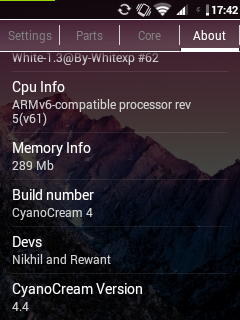
Custom Rom Kitkat Cyanocream v4 for Samsung Galaxy Y GT S5360
Custom Rom Kitkat Cyanocream v4 for Samsung Galaxy Y GT S5360
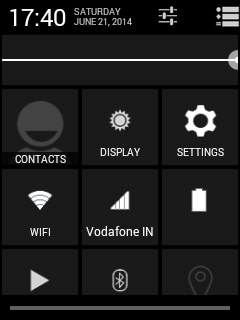
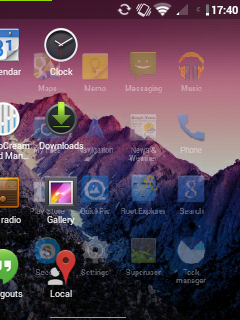
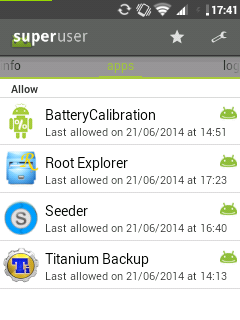
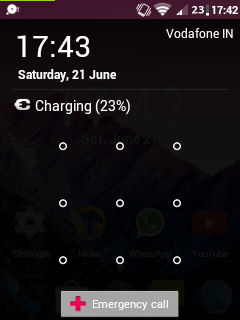
Oke bro langsung saja malam ini saya akan memberikan custom rom buat gakyoung yaitu Custom Rom Kitkat Cyanocream v4 for Samsung Galaxy Y [GT-S5360]
Lihat Penampakannya:
![Custom Rom Kitkat Cyanocream v4 for Samsung Galaxy Y [GT-S5360]](https://blogger.googleusercontent.com/img/b/R29vZ2xl/AVvXsEhOkyjdutRgFZvaaI90Fc8-tvcFesXsztSkpKfj_RM402el8TclMjx4HNKKDLNm8rcQVgXTwoIDhuv0ruwyH26KsMnGsnJxPs8jk1AO46wCG-XfdfJ1J7dnlwDmFfsQjyCNNI0cw2JdY84u/s1600/wallpaper_01.jpg "Custom Rom Kitkat Cyanocream v4 for Samsung Galaxy Y [GT-S5360]")


Bahan:
- A rooted Galaxy Y with a stock rom
- CWM download it from here
- Cyanocream v4 from here
- Cyanocream v4.1 from here (update only)
- Cyanocream v4.2 from here (update only)
- Turn off your phone and wait till it vibrates
- After it vibrates press the three button combo (volume up+home+power button)
- Then use the volume up/down keys and select apply update from sd card and select CWM Recovery.zip
- Now go to mounts and storage and mount all partitions except the sd-ext because it is not possible on the stock kernel of galaxy y
- Then go to apply update from sd card and then choose zip from sd card
- After that select Cyanocream v4.zip
- Aroma Installer will start after a few seconds
- Choose a theme of your choice
- Then keep pressing next in the instructions
- After that select installation of stock kernel
- Do not select reboot after installation
- Now select install
- After the installation of the stock kernel is complete go to advanced and select reboot recovery
- After that the phone would boot again the stock recovery (the red one)
- Again select apply update from sd card and then select CWM Recovery.zip
- Now select apply update from sd card, choose zip from sd card and then select Cyanocream v4.zip
- This time select installation of White XP 1.3.3 and DO NOT select reboot after installation.
- Again go to advanced and then select reboot recovery
- Now again select Cyanocream v4.zip from sd card
- This time choose the installation of Cyanocream Rom and select reboot after installation
- The installation will take some time to complete
- Now the device will reboot on its own.
- The first boot will take time (4-5 minutes) and it might even show the boot animation 2 times so dont think that it is stuck in a bootloop
- Finally you have installed Cyanocream v4 on your galaxy y
Go to link download

Monday, October 24, 2016
Cyanogenmod 12 Lollipop 5 0 x untuk Samsung Galaxy Y GT S5360
Cyanogenmod 12 Lollipop 5 0 x untuk Samsung Galaxy Y GT S5360
Selamat Malam semuanya! Hallo sobat saya akan memberikan berita tentang Cyanogenmod 12 ( Lollipop 5.0.x ) untuk Samsung Galaxy Y GT - S5360 Berita bagus bagi penggemar Cyanogenmod ! Samsung galaxy Y GT - S5360 akan mendapatkan CyanogenMod 12 Custom rom . Ini berarti bahwa perangkat pengguna Samsung galaxy Y GT - S5360 akan segera merasakan Android 5.0.x Lollipop di galyong . Berita ini ditunggu-tunggu para pengguna Samsung galaxy Y GT - S5360 dalam waktu yang amat lama . Cyanogenmod 11 juga mendapatkan stabil setelah setiap update . Saya hanya berharap bahwa pengembang cyanogenmod 12 ( android armv6 ) bergegas dan merilis versi stabil cyanogenmod 12 karena mereka sudah merilis membangun eksperimental tetapi tidak flashable dan ada sedikit bug.
 |
| cyanogenmod 12 |
Tapi sayang nya proyek cyanogenmod 12 telah ditutup oleh pengembang jadi tak usah khawatir karna cyanogenmod 11 sudah ada yang final. baca disini
Go to link download
Wednesday, September 21, 2016
CUSTOM ROM LewaOS for Samsung Galaxy Y GT S5360
CUSTOM ROM LewaOS for Samsung Galaxy Y GT S5360
Oke bro umpa lagi. kali ini saya akan memberikan custom rom paleng joss :D CUSTOM ROM LewaOS for Samsung Galaxy Y [GT-S5360]. Oke bro langsung delok penampkannya . jess
Screenshots:-
![CUSTOM ROM LewaOS for Samsung Galaxy Y [GT-S5360]](https://blogger.googleusercontent.com/img/b/R29vZ2xl/AVvXsEgcdV1vZe2tyv5NO5jSSTi-WoY8OGqe-ypyslYwhSvzlc0qQrcK63Uc-dnTkoMVDxf-3Fn9cgIamSzex_3boUREonSaTy2llZoQNT3ybPJunJh_T1Ebb37tsG0FTCsGzxe4ksHgFHfJASY6/s1600/l1.jpg "CUSTOM ROM LewaOS for Samsung Galaxy Y [GT-S5360]")
Bahan :
- A Samsung Galaxy Y with stock firmware
- LewaOS.zip from here
- CWM Recovery from here
- PercyCM Kernel from here
- Turn off your Galaxy Y and boot in recovery mode using the three button combination (volume up+home+power button)
- Now using the volume up/down keys to navigate select apply update from sd card
- Choose CWM Recovery.zip
- Now your Galaxy Y will boot in ClockWorkMod Recovery v5.0.28
- Go to mounts and storage and mount all partitions except sd-ext as it is not possible on the stock kernel
- Then select wipe data/factory reset and then wipe cache
- Now go to advanced and select wipe battery stats and wipe dalvik cache
- After all this is done go to apply update from sd card>choose zip from sd card>percy cm#2.zip
- Wait for the installation to complete and then go to advanced and select reboot recovery
- Your device will reboot in ClockWorkMod Recovery v5.0.26
- Now do everything from step 6-8 again
- Then go to apply update from sd card>choose zip from sd card>LewaOS.zip
- Wait for the installation to complete and then select reboot system now
Pokoe intine DYWOR bro lakukan dengan resiko anda sendiri ..Makasih bro udah mampir
Baca Juga : Cara Update Samsung Galyoung GT-S5360 ke Jely bean [4.1]
Go to link download
Sunday, August 7, 2016
Spesifikasi Kelebihan Samsung Android Galaxy Y S5360
Spesifikasi Kelebihan Samsung Android Galaxy Y S5360
Spesifikasi Kelebihan Samsung Android Galaxy Y S5360
 Samsung Galaxy Y S5360 adalah smartphone terbaru yang dikeluarkan oleh Samsung. Dengan harga yang lebih murah dari generasi sebelumnya ponsel ini menawarkan berbagai fitur yang cocok untuk anak muda yang ingin mengenal smartphone.
Kelebihan dari smartphone Galaxy Y S5360 adalah dukungan prosessor dengan kecepatan 883 MHz processor dan sudah menggunakan Android Gingerbread. Namun untuk kamera masih dirasa kurang dengan resolusi yang hanya 2 MP dan layar 256 ribu warna dengan resolusi 240 x 320 pixel berukuran 3.0 inchi.
Berikut adalah spesifikasi Smartphone Samsung Galaxy Y S5360
Umum | Jaringan 2G | GSM 850 / 900 / 1800 / 1900 |
Jaringan 3G | HSDPA | |
Diperkenalkan | Agustus 2011 | |
Ukuran | Dimensi | 104 x 58 x 11.5 mm |
Berat | 97.5 g | |
Layar | Tipe | TFT capacitive touchscreen, 256 ribu warna |
Ukuran | 240 x 320 pixel, 3.0 inchi | |
- TouchWiz UI - Touch sensitive controls | ||
Audio | Alert types | Vibration, MP3 ringtones |
Loudspeaker | Yes | |
3.5mm jack | Yes | |
MemoriGo to link download
Read more »
Saturday, August 6, 2016Custom Rom CM7 Optimus Nexus Me v5 Untuk Galaxy Y GT S5360Custom Rom CM7 Optimus Nexus Me v5 Untuk Galaxy Y GT S5360Halo sobat langsung saja saya akan membagikan tentang Custom Rom [CM7] Optimus Nexus Me v5 Untuk Galaxy Y GT-S5360 Optimus Me Nexus adalah custom rom didasarkan dari CyanogenMod7 dan saat ini dikembangkan oleh Yash98 di forum xda - developer . Dari tampak itu , titik rom ini adalah untuk memberikan pengguna Nexus 4 nuansa dan melihat , dilihat bagaimana bertema pada screenshot . Ini adalah sangat ringan dalam ukuran rom dan memiliki semua bloatware dihapus , bahkan sebagian besar aplikasi Google , tetapi Anda yang tersisa dengan Play Store dan Google Search . oke langsung saja penampakannya: fitur:
Screenshots:![Custom Rom [CM7] Optimus Nexus Me v5 Untuk Galaxy Y GT-S5360](https://blogger.googleusercontent.com/img/b/R29vZ2xl/AVvXsEjfIIXbEfkQWrt-DseSaz3pNvZmCh1iN9UtgG74pvpIZ7_onXvpY9ik8FYmukjxXFSyADoozUQo-uaXdCplpc-h-55tEPR7TS3PNHnK_P1lybGBPyDckhtn89c8b35gz19p75oX83kxFNtd/s1600/Sintiacutetulo2_zps7c1bc3e1.png "Custom Rom [CM7] Optimus Nexus Me v5 Untuk Galaxy Y GT-S5360") Bahan Download ROM - Click here. Download Kernel (required) - Click here. Cara Install:
Go to link download
Subscribe to:
Posts (Atom)
|